
When using AI, specifically a Large Language Model (LLM), the quality of the response depends entirely on the quality of your input. Vague prompts will produce vague answers, and long unstructured prompts can confuse AI tools. Markdown, originally created for writing web content, is a lightweight way of adding structure to text and is incredibly useful when writing prompts for LLMs.
In this guide, we’ll walk through the basics of Markdown and show how you can use it to write more structured and reliable AI prompts.
💡 Prefer a quick reference? Scroll to the bottom of this post to download our free AI prompting with Markdown Cheat Sheet for ready-to-use templates and syntax reminders instantly.
What is Markdown?
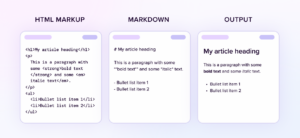
Markdown is a text-based way for creating structured written content. It allows writers to create blogs and other web articles without having to use HTML (the programming language our browsers use to display content). It was created in 2004 by John Gruber to make text that is easy for humans to read and write, while still being perfectly readable for a machine. Because of this it has become hugely popular among developers and technical writers and more recently Large Language Models (LLMs).
Why is Markdown good for AI prompts?
Using Markdown gives your prompt structure and hierarchy. This allows the AI to better understand the intent behind what you’re asking and to differentiate between your background information and the request you’re making.
It can also be more cost effective compared with other structured formats. Because it uses minimal syntax compared to HTML, you use fewer characters to achieve higher precision.
As the industry standard for technical documentation, Markdown makes it easy to copy/ paste between platforms. Moving between the AI and Slack, GitHub, or a CMS is simple without any manual reformatting or custom cleaning scripts.
Markdown basics
You don’t need to be a developer to use Markdown, these are the basic formatting elements you need to know:
Headings
Headings start with a # character, the number of #’s indicate the heading level so you can create hierarchy.
# Heading 1

## Heading 2

### Heading 3

#### Heading 4
Emphasis
You can create bold and italic text to add emphasis to different words or phrases.
This is a sentence with both a **bold part** and also an *italic part*.
Lists
Markdown supports both numbered (ordered) and bulleted (unordered) lists.
1. Ordered list item 1
2. Ordered list item 2
3. Ordered list item 3

- Unordered list item 1
- Unordered list item 2
- Unordered list item 3
Section Breaks
To indicate a section break you can add a horizontal line, this is done by adding three or more asterisks or hyphens.
Section one

---

Section two
Section one

***

Section two
Quotes
If you want to reference a direct quote you need to start the line with a > character.
> This is text quoted from somewhere else
Codeblocks
If you need to include code or other data (e.g, a CSV data table) you can wrap the entire section in a code block. To do this, place a ''' line before and after the data.
```
First name, Last name, email
John, Smith, [email protected]
Jane, Doe, [email protected]
```
Using Markdown to structure your prompt
Putting this all together, here's an example of how to use Markdown to structure a prompt. This is a trivial example but scales well to more complex tasks.
Before
I want you to act as a copywriter and write a blog post about coffee. Make sure you mention the history and brewing methods but don't mention Starbucks. Keep it under 500 words and use a professional tone.
After
# Role
You're an expert copywriter.

## Task
Write a blog post about coffee, including the history and brewing methods.

## Constraints:
- Tone: Professional
- Length: <500 words
- Do not mention Starbucks.
Common Markdown mistakes
- Missing space: A header needs a space after the symbol. #Header is just text. # Header is a structural command.
- Skipping levels: Don't jump from # to ###. It breaks the logic tree the AI is trying to follow.
- Unclosed blocks: If you start a code block with triple backticks and forget to close it, the AI thinks your entire prompt is just one long piece of data.
Bonus: Getting an AI to return Markdown
Markdown's biggest strength is portability. If you want a response you can actually use in Notion, Slack, or your CMS without spending twenty minutes fixing the formatting, add this to your prompt:
"Provide the response in clean, valid Markdown format inside a code block."
This keeps the AI from adding conversational fluff like "Here is the summary you asked for!" inside the text you're trying to copy.
Put structure into practice
To help you transition away from messy, unreliable prompts, we've put together a practical AI prompting with Markdown Cheat Sheet.
It includes ready-to-use templates, syntax reminders, and examples you can copy and paste directly into your workflow to start getting cleaner, more reliable AI outputs today.
Download the free cheat sheet by submitting the below form 👇